When hiring a 3D scanning service, many companies focus primarily on data accuracy while overlooking the importance of the 3D file format delivered at the end of the project.
In reality, each file format such as STP, STL, OBJ, or PDF serves a different purpose, including reverse engineering, CNC machining, 3D printing, or quality inspection. Choosing the right 3D file format from the beginning helps businesses maximize the value of scanned data and avoid additional processing costs later.
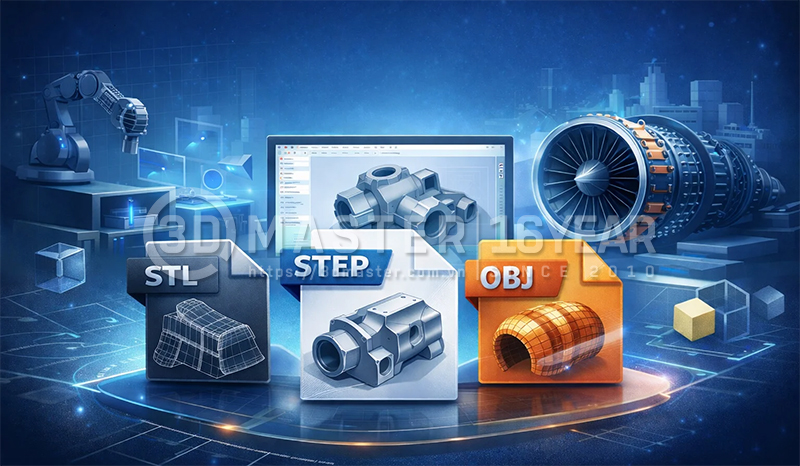
After completing a 3D scanning process, data can be exported into various 3D file formats. Depending on project requirements and customer needs, the service provider can process and deliver different file types.
Mesh Files such as STL and OBJ
These file formats represent the object's surface geometry using millions of interconnected triangles, accurately recreating the external shape of the scanned object.
CAD Files such as STP, XT, and IGS
These files contain geometry built from surfaces, curves, and engineering features, allowing the model to be represented as a standard CAD model rather than a triangular mesh.
Inspection Report Files such as PDF and Excel
These are not actual 3D files. Instead, they contain analysis and comparison results between the physical object and the reference model, including dimensions, deviations, and inspection data.
Point Cloud Files such as ASC, XYZ, and PLY
These are raw scanning datasets containing millions of coordinate points in 3D space. They preserve the geometric information of the scanned object before processing or conversion into other formats
There is no single 3D file format suitable for every purpose. The right format depends on the intended application, workflow, and technical requirements of the business.
For 3D Printing or Model Archiving
STL and OBJ are the most widely used formats because they are easy to share, compatible with most 3D printing software, and ideal for rapid prototyping or preserving product geometry.
For Reverse Engineering
CAD formats such as STP, XT, or IGS are recommended because engineers can edit models, modify dimensions, rebuild technical drawings, and integrate them directly into software such as SolidWorks, NX, Creo, or CATIA.
For CNC Machining
STP and XT are typically preferred because they contain high-precision CAD geometry, support CAM programming, and meet the requirements of precision manufacturing.
For Product Quality Inspection
Businesses should request PDF or Excel inspection reports along with measurement data to evaluate dimensional deviations, verify tolerances, and quickly identify non-conforming areas.
For Site Surveying or Advanced Data Processing
Point Cloud formats such as ASC, XYZ, and PLY are more suitable because they store the original scan data with high point density, making them ideal for analysis, modeling, and further data processing.
.jpg)
Although many different 3D file formats can be generated through 3D scanning and scan data processing, STL, OBJ, STP, XT, IGS, and PDF are among the most commonly used in practice.
| Format | Editable Design | Suitable for Reverse Engineering | Suitable for 3D Printing | Suitable for CNC Machining | Suitable for Inspection |
|---|---|---|---|---|---|
| STL | No | Limited | Yes | No | Limited |
| OBJ | No | Limited | Yes | No | Limited |
| STP (STEP) | Yes | Yes | Convertible | Yes | Yes |
| XT (Parasolid) | Yes | Yes | Convertible | Yes | Yes |
| No | No | No | No | Yes |
In summary, STL and OBJ are ideal when businesses need 3D models for visualization or 3D printing.
STP and XT are the optimal choices for reverse engineering projects, engineering modifications, and CNC machining.
Meanwhile, PDF is not a 3D file format but remains an important document for evaluating deviations and controlling product quality after scanning.
Many companies invest in 3D scanning services but still fail to utilize the data effectively because they request the wrong 3D file format from the outset. This can lead to additional processing time, conversion costs, or even the need to repeat the project.
Requesting Only STL Files While Expecting Design Modifications
STL files contain only triangular mesh data and cannot be edited like engineering CAD files.
Requesting Point Cloud Data When CNC Machining Is the Actual Goal
Point cloud datasets contain millions of measured coordinates but cannot be directly used in manufacturing workflows.
Not Requesting Inspection Reports for Product Acceptance
Without inspection reports, businesses lack the necessary evidence to evaluate quality and verify compliance with design tolerances.
Failing to Align File Format Requirements with the Engineering Team Before Scanning
This often results in delivered data that is incompatible with the CAD/CAM software used by the company.
Accepting Only One File Type
Future requirements may force the company to pay for data conversion services or even rescan the product.
Choosing the correct 3D file format allows businesses to maximize the value of scanned data for reverse engineering, CNC machining, 3D printing, and quality inspection. If you are unsure which format to request, consult your service provider before the project begins to ensure the output meets your actual application requirements.
3D Master currently provides 3D scanning services, reverse engineering, 3D inspection, and delivers complete datasets in STP, XT, IGS, STL, OBJ, Point Cloud formats, along with PDF deviation reports, enabling businesses to efficiently apply scanned data to design, manufacturing, and quality control.
Hotline / Zalo / LINE / Telegram / WhatsApp / Viber / KakaoTalk:
+84 982 089 198 | +84 986 333 960
Email:
cuong3dmaster@gmail.com
hung3dmaster@gmail.com
tech3dmaster@gmail.com
Website: https://3dmaster.com.vn